BPM definition
Business Process Management (BPM) is a management discipline for designing, documenting, improving, and governing how work gets done. BPM combines process clarity (models and SOPs) with measurement (KPIs) and continuous improvement—so operations become faster, more reliable, and easier to scale.
- BPM is not a tool — it is a lifecycle (discover → model → improve → govern).
- Good BPM starts small: one process, one owner, clear success metrics.
- BPM works when ownership is explicit (process owner + review cadence).
- BPMN helps when handoffs, exceptions, and approvals matter.
- SOPs are the bridge between models and execution: make them usable, not perfect.
- Automation works best after standardization (SOPs + governance).
- Measure outcomes (cycle time, rework, exception rate), not activity.
- Treat exceptions as data: they tell you what to fix next.
What is BPM (and what it isn't)
BPM is a structured way to manage how work flows through your organization.
BPM is:
- A lifecycle for continuously improving processes
- A way to make work measurable and governable
- A bridge between business and IT (shared models, shared language)
BPM is not:
- A one-time documentation exercise
- A reorg disguised as a process project
- A “big-bang” platform rollout
The goal is simple: reduce friction in how work gets done — while increasing reliability.
Insight
If a process has no owner and no review cadence, it will drift. BPM works when ownership is explicit.
The BPM lifecycle (discover → model → improve → govern)
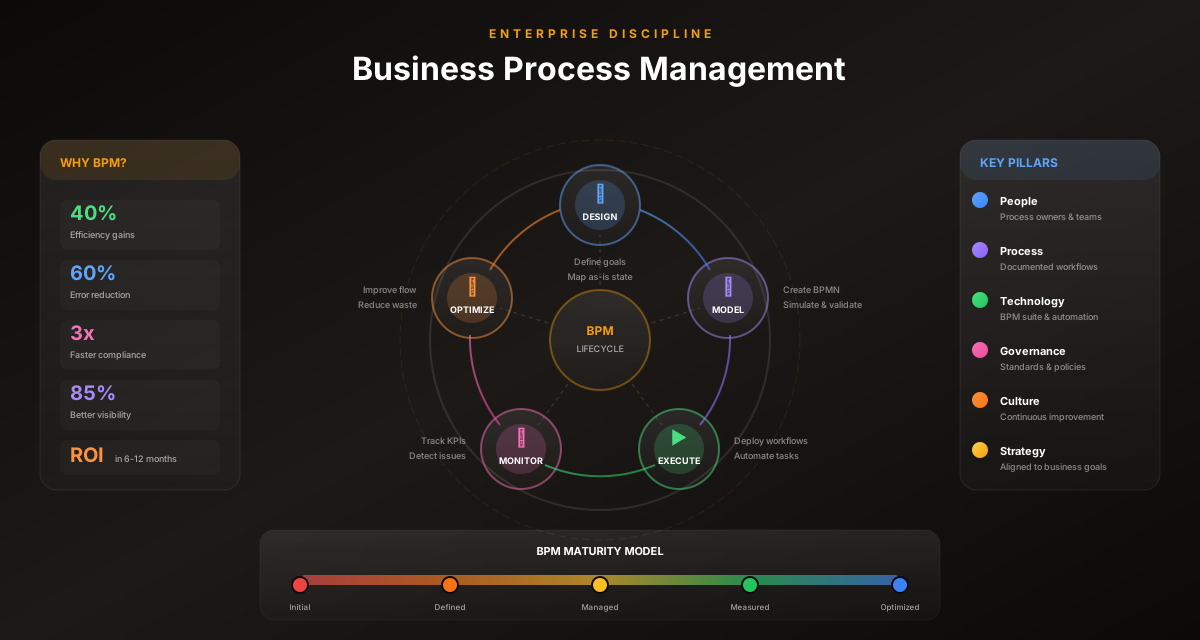
Most BPM programs fail because they jump straight to automation. A practical lifecycle looks like this:
- Discover: observe the real process, including exceptions
- Model: capture the flow in a shared notation (often BPMN)
- Standardize: turn the model into an SOP that people follow
- Measure: define KPIs and baseline the current state
- Improve: remove waste, simplify handoffs, clarify decisions
- Automate: automate stable steps (keep humans in the loop for approvals)
- Govern: assign ownership, versioning, audit trails, and reviews
You can run this cycle in weeks — not quarters — if you keep the scope tight.
Start with a “boring” process
Pick a process that happens often, has clear outcomes, and is painful enough to justify effort (approvals, onboarding, requests). The ROI will be obvious.
BPM vs BPA vs RPA vs workflow automation
These terms overlap, but they are not the same:
| Term | What it focuses on | Typical outcome |
|---|---|---|
| BPM | Managing and improving the end-to-end process | Standardization + KPIs + governance |
| BPA | Automating stable process steps | Faster cycles + fewer errors |
| RPA | Mimicking clicks in UIs | Quick wins on legacy systems |
| Workflow automation | Orchestrating tasks across people and systems | Better coordination + visibility |
Rule of thumb: BPM defines and governs the process. BPA/RPA execute parts of it.
Pro Tip
If you can’t explain the process in two minutes, automation will likely fail. Start with clarity, then automate.
When BPMN helps (and when it's overkill)
BPMN is most valuable when:
- Work crosses multiple roles or teams
- Exceptions matter (not just the happy path)
- Approvals and compliance require evidence
- You want a path from documentation to execution
BPMN can be overkill when:
- The workflow is purely personal (one person)
- The process changes daily (no stable pattern)
- You just need a quick brainstorm
If you’re unsure, start with a simple flowchart — then evolve into BPMN when handoffs and rules become important.
How to start BPM in 30 days (without bureaucracy)
Here is a pragmatic rollout plan:
Week 1: Pick the pilot
- Choose one process with measurable pain
- Assign a process owner
- Define 2–3 success metrics
Week 2: Capture the real workflow
- Interview the people who do the work
- Document exceptions and decision points
Week 3: Standardize + validate
- Model the process (BPMN if needed)
- Turn it into an SOP
- Review with stakeholders and get sign-off
Week 4: Improve and automate the stable steps
- Remove unnecessary steps and handoffs
- Add approvals where judgment is required
- Automate repeatable parts
Outcome: one process that is clearer, faster, and governed — plus a playbook you can repeat.
Avoid “process theater”
If your deliverable is only a diagram, the value fades quickly. Pair every model with an SOP and a metric so improvements stick.
KPIs that matter for BPM
Track outcomes that reflect real operational health:
- Cycle time: end-to-end time from trigger to outcome
- First-time-right rate: how often work completes without rework
- Exception rate: share of cases leaving the happy path
- Approval latency: time spent waiting for sign-off
- SLA adherence: percentage of cases meeting target times
- Audit readiness: ability to reconstruct what happened and why
Pick a small set of KPIs. If you measure everything, you improve nothing.
Process architecture: the missing layer in most BPM programs
A lot of BPM frustration comes from unclear structure. Teams document everything in one diagram, then wonder why nobody uses it.
A pragmatic hierarchy keeps work readable and governable:
- Value stream / value chain: the big picture (order-to-cash, hire-to-retire)
- Process: a measurable end-to-end flow (invoice approvals)
- Subprocess: a coherent chunk of work (validate invoice data)
- Procedure / SOP: step-by-step execution guidance
- Task: one unit of work
Why this hierarchy matters
- It prevents “wallpaper diagrams” that nobody can review.
- It helps you assign ownership (process owner vs SOP owner).
- It creates a natural path from documentation → standardization → automation.
Rule of thumb: if your happy path has more than ~12–15 main activities, split into subprocesses and link them.
This is where BPMN helps: subprocess boundaries, roles (lanes), and decision points (gateways) become explicit instead of implied.
Pro Tip
If you can’t name the outcome of the diagram in one sentence, your scope is probably too big. Split it.
Roles & operating model: who owns what (so it doesn’t drift)
BPM is not a “process documentation” activity. It’s an operating model.
Minimum roles that make BPM work
- Process owner: accountable for outcomes, scope, and changes
- Analyst / facilitator: models the process, drafts SOPs, runs reviews
- Operators / SMEs: provide reality (exceptions, workarounds, constraints)
- IT / platform owner: integrations, security, reliability
A practical RACI (example)
| Activity | Owner | Analyst | Operators | IT |
|---|---|---|---|---|
| Define scope + success metrics | A | R | C | C |
| Model process (BPMN) | C | R | C | C |
| Approve changes to controls/approvals | A | R | C | C |
| Implement integrations | C | C | I | R |
| Monthly KPI review | A | R | C | C |
If ownership isn’t explicit, drift is guaranteed. The fastest way to make it explicit: put the owner’s name and review cadence on the SOP and in the workflow metadata.
Make ownership visible
Treat ownership as part of the deliverable. If a process has no owner, it’s not a process — it’s a suggestion.
Governance: how BPM stays valuable after the workshop
The moment a process model is published, it begins to drift — because reality changes.
Governance is the set of habits and controls that keep the model aligned with execution:
- Versioning: what changed and why
- Change control: who approves changes (especially approvals and compliance controls)
- Audit trail: what happened during execution and who signed off
- Review cadence: quarterly, or after major system/policy changes
- Feedback loop: a low-friction way to report “this step is wrong”
The drift trap
If exceptions are handled in email and DMs, your process stops being the system of record.
The fix
Design exception paths explicitly and keep humans in the loop where judgment is required. Governance becomes much easier when the workflow expects reality instead of pretending it doesn’t exist.
Important
If your process requires compliance evidence, approvals must be explicit steps and decisions must be logged automatically — otherwise evidence collection becomes a second process.
Worked example: invoice approvals (end-to-end)
Invoice approvals are a strong BPM pilot because they are frequent, measurable, and cross-functional.
Typical “before”
- invoices arrive via email
- checks happen in spreadsheets
- approvals are forwarded
- exceptions are “handled manually”
- nobody can answer: “where is it right now?”
A BPM model you can actually run
Discover the real steps and exceptions, then model a workflow like:
- Receive invoice
- Validate required fields
- Match vendor + PO
- Route approval by threshold
- Branch outcomes: approved/rejected
- Handle exceptions (missing data, mismatch, timeout)
- Record decision + evidence
- Close and publish metrics
What to model explicitly
- missing PO number
- mismatched vendor
- approval timeout and escalation
- partial approvals / conditional approval
This is where BPM wins: not in the happy path, but in reliable exception handling.
Next: see real automation patterns and use cases.
The BPM stack in 2026 (what you actually need)
BPM is a discipline — but tools matter once you scale.
A practical stack looks like this:
- Modeling: BPMN for shared language
- SOPs: documentation tied to the model (not a separate doc that drifts)
- Execution: workflow management system for ownership + approvals
- Automation: stable steps executed via integrations and/or browser agents
- Governance: versioning, access control, audit trails
- Measurement: dashboards for cycle time, exceptions, rework
You don’t need all of this on day one.
Start with modeling + SOP + basic execution. Add automation once the process is stable.
Evaluate tools on exceptions, not happy paths
Ask: “What happens when data is missing, someone rejects, or the system is down?” That answer predicts your real-world success.
Templates you can reuse (process charter + KPI starter set)
If you want BPM to move fast, standardize the inputs.
Template: process charter (copy/paste)
- Process name:
- Owner:
- Goal / outcome:
- Scope (in/out):
- Trigger:
- End condition:
- Stakeholders:
- Top 3 exceptions:
- Approvals required:
- Success metrics (2–3):
- Review cadence:
KPI starter set (pick 2–3)
- cycle time
- approval latency
- exception rate
- rework / first-time-right
- SLA adherence
Use these templates for every new BPM pilot. Consistency is how you scale BPM without bureaucracy.
BPM maturity model: what “good” looks like (and how to get there)
BPM isn’t binary. Teams evolve through maturity stages.
Level 1: Ad-hoc execution
- Work happens, but it’s not repeatable.
- Knowledge lives in people’s heads.
- Success depends on heroics.
Signal: “We can’t tell where a case is right now.”
Level 2: Documented
- You can describe the process.
- SOPs exist, but drift is common.
Signal: “We have documentation, but nobody trusts it.”
Level 3: Governed
- Ownership, versioning, and review cadence exist.
- Approvals are explicit and auditable.
Signal: “We can explain what changed and why.”
Level 4: Measured and improving
- KPIs are tracked and used to prioritize improvements.
- Exceptions are categorized and reduced over time.
Signal: “We can show cycle-time improvements quarter over quarter.”
Level 5: Adaptive execution
- Stable steps are automated; humans handle judgment.
- Changes are tested safely and rolled out continuously.
Signal: “We can change the process without breaking operations.”
How to move up one level
- From 1 → 2: pick one process and document reality.
- From 2 → 3: add owner + versioning + review cadence.
- From 3 → 4: baseline metrics and review exceptions monthly.
- From 4 → 5: automate stable steps and keep repair loops for the rest.
BPM maturity is mostly habits, not software.
Insight
Most teams jump from Level 2 to Level 5 (“let’s automate”) and end up back at Level 1 (“we’re doing it manually again”). Move one level at a time.
Improvement toolkit: how to improve processes without turning it into a program
Once the process is visible, improvement becomes practical.
The 80/20 of improvement
Start with what usually creates most pain:
- approval waiting time
- missing inputs / rework
- unclear decision rules
- handoffs between teams
Lean: remove waste
Lean is useful when you have too many steps, handoffs, and waiting.
Look for:
- unnecessary approvals
- duplicated checks
- waiting queues
- “just in case” steps nobody can justify
Six Sigma: reduce variation
Six Sigma is useful when outcomes vary too much (quality/compliance).
Look for:
- defect/rework causes
- inconsistent decision criteria
- inconsistent inputs
A practical improvement loop
- Pick 1–2 KPIs (cycle time + exception rate is a strong start)
- Identify the top 3 delays or defects
- Change one thing
- Re-measure
- Repeat
If improvement feels slow, your KPI is probably too broad or your scope too large. Tighten both.
Fix the decision rules first
Unclear rules create rework and exceptions. Making a decision explicit often removes more delay than adding automation.
Automation playbook: what to automate (and what not to)
Automation is not a goal. It’s a method.
What to automate first
Automate steps that are:
- frequent
- rule-based
- low-risk
- already standardized
Examples: routing, notifications, data validation, status updates, evidence capture.
What not to automate early
Avoid automating steps that are:
- ambiguous (“use judgment”)
- highly exception-driven
- politically sensitive approvals
- not standardized
Human-in-the-loop is a feature
A strong BPM automation design uses humans where judgment matters:
- approvals
- exception handling
- policy decisions
Integration reality
Your systems determine your automation approach:
- If you have APIs: automate reliably.
- If you don’t: use UI fallbacks/browsers agents + checkpoints.
No-code vs low-code automation →
Workflow automation best practices →
The best automation outcome is not “no humans”. It’s “humans only where they add value”.
Important
Automating a broken process doesn’t fix it — it makes it fail faster and at scale.
Process mining: when it helps (and when it doesn’t)
Process mining uses event logs to reconstruct how work actually flows.
When process mining helps
- your process runs through systems that log events
- you suspect the “real process” differs from the documented one
- you need evidence for where time is spent (waiting vs working)
What process mining cannot do
- it can’t capture steps that happen outside systems (email, meetings)
- it can’t interpret intent or policy decisions
- it can’t replace operator interviews
A pragmatic approach
Use process mining to generate hypotheses:
- “Approvals add 70% of cycle time”
- “Most cases loop back due to missing data”
Then validate with operators and update the model.
If you treat mining output as truth, you’ll optimize noise. Treat it as a map to better questions.
Scale and sustain: how BPM expands across teams
Once one process works, the temptation is to “BPM everything”. Resist that.
How BPM scales sustainably
- scale a playbook (templates + patterns)
- keep governance lightweight but consistent
- train owners to maintain processes
A simple scaling sequence
- Pilot 1: ship a working v1 end-to-end
- Pilot 2: reuse templates and improve speed
- Pilot 3+: build a shared library of patterns (approvals, escalations, exception queues)
What a lightweight BPM center of excellence (CoE) does
- sets modeling and SOP standards
- maintains templates
- runs reviews for high-risk workflows
- coaches process owners
BPM becomes “too heavy” only when you centralize everything. Keep ownership distributed and standards shared.
Which process should you fix first? A simple scoring matrix
Picking the right pilot process is half the battle.
A strong BPM pilot has three properties:
- frequency (it happens often)
- measurability (you can baseline time/quality)
- cross-functional pain (handoffs + approvals)
A simple scoring matrix (1–5)
Score each candidate process:
| Criterion | What to look for |
|---|---|
| Frequency | weekly/daily volume |
| Cycle-time pain | obvious waiting, escalation, SLA misses |
| Exception rate | missing data, rework loops, policy exceptions |
| Risk | money, access, compliance, customer impact |
| Stakeholder alignment | owner exists, teams want it fixed |
| Automation potential | stable rules + repeatable steps |
Add the scores. The top 1–2 candidates are your pilot list.
Example
- Invoice approvals: high frequency, high approval latency, high audit value → great pilot
- Strategic planning: low frequency, high ambiguity → poor pilot
A practical guardrail
Avoid the “most politically important” process as your first pilot. Start with the process that will show visible value fast — then use that momentum to tackle harder ones.
This is how you prevent BPM from turning into a never-ending roadmap.
Pick processes with a clear “done”
If you can’t define the end condition, you can’t measure improvement. Choose a process with a crisp outcome first.
BPMN conventions that keep diagrams readable (and automation-ready)
BPMN is powerful — but only if the team shares conventions.
Conventions that pay off immediately
- Verb–object naming for tasks: “Validate invoice”, “Approve request”
- One start event and clear end outcomes
- Swimlanes for roles so ownership is visible
- Gateways labeled with conditions (not “Yes/No” unless the question is clear)
- Subprocesses when the happy path exceeds ~12–15 activities
Modeling approvals
Treat approvals as first-class tasks:
- “Review request” → “Approve request” → gateway → approved/rejected paths
Modeling exceptions without clutter
- model top exceptions (frequency/risk)
- keep the rest in SOPs or an exception catalog
Common BPMN anti-patterns
- unlabeled gateways
- “wallpaper diagrams” (too big to review)
- mixing system actions and human actions without clarity
If you want deeper symbol guidance, use a reference page and keep your model focused.
Controls and compliance: designing BPM for auditability
For many organizations, BPM is a compliance enabler — but only if controls are designed into the workflow.
What auditors typically need
- who approved a decision
- when it happened
- what context/evidence existed
- why a decision was made (reason codes, comments)
Control design patterns
- Segregation of duties (SoD): requester cannot approve their own request
- Dual approval thresholds: higher amounts require additional roles
- Timed escalations: approvals can’t stall indefinitely
- Evidence capture: attach documents/links to the case
Change control (the other audit requirement)
Audits often fail not because execution was wrong, but because teams can’t explain process changes.
Minimum change control:
- version every process change
- record the reason
- define approvers for control changes
- keep a review cadence
If you embed controls into BPMN + SOP + execution logs, evidence collection becomes a byproduct — not a separate project.
Important
If approvals happen outside the workflow (email/DMs), you will end up running a second process just to reconstruct evidence.
Mini case studies: where BPM delivers fast ROI
BPM delivers fastest value in workflows with handoffs, approvals, and visible pain.
Case 1: employee onboarding
Before: checklists in email, missed steps, inconsistent access.
BPM approach:
- model roles (HR, IT, hiring manager)
- define “ready to start” outcome
- add explicit approvals for access
- track cycle time and exceptions
Result: fewer missed steps, faster time-to-productivity.
Case 2: access requests (compliance-heavy)
Before: approvals in chat, incomplete audit trails.
BPM approach:
- explicit approval steps
- SoD controls
- evidence capture
- escalation timers
Result: audit readiness and fewer risky exceptions.
Case 3: customer escalation routing
Before: tickets bounce between teams.
BPM approach:
- define routing rules
- model exception queue
- create repair loop for missing data
Result: less ping-pong, better SLA adherence.
The throughline: BPM is most valuable when it turns invisible coordination into an explicit, measurable system.
The BPM operating rhythm: how to keep improvements compounding
BPM becomes powerful when it’s run like an operating system — small loops, done consistently.
A simple cadence that scales
Weekly (30 minutes)
- review stuck work and aging cases
- review top exception categories
- decide: fix rule vs fix data vs fix training
Monthly (60 minutes)
- review KPIs (cycle time, exception rate, rework)
- review improvement backlog
- approve 1–2 changes
Quarterly (90 minutes)
- review the process definition and SOP
- review controls/approvals and audit requirements
- review ownership and stakeholder changes
Why cadence matters
Without cadence, you only improve when things break. With cadence, improvements compound.
A practical “BPM board”
Keep a lightweight board of:
- top exceptions
- bottlenecks and waiting points
- approved improvements
- changes shipped (with version + reason)
This turns BPM into a living system, not a one-time project.
SOPs that people actually use: structure, tone, and maintenance
Most SOPs fail because they read like policy, not like operational guidance.
A practical SOP structure
- Purpose (what this SOP achieves)
- Trigger + outcome (when it starts, what “done” means)
- Roles (who does what)
- Happy path (step-by-step)
- Top exceptions (what to do when things go wrong)
- Approvals and controls (what requires sign-off)
- Evidence (what must be recorded)
- KPIs (how success is measured)
- Owner + review cadence
Tone and wording
- write for the person doing the work
- use clear verbs (“submit”, “approve”, “attach”)
- keep steps short
- include examples of “good” vs “bad” inputs
Maintenance rules
- treat SOPs as versioned artifacts
- update SOP when the workflow changes (and vice versa)
- review quarterly
If your model is the backbone, the SOP is the muscle. It’s what turns clarity into execution.
Publish SOPs at the point of work
A perfect SOP in a hidden folder is worse than a good SOP linked from the workflow tool.
Automation and AI in BPM: where it fits (and how to keep it safe)
AI can accelerate BPM — but only when governance is strong.
Where AI helps most
- summarizing unstructured inputs (emails, notes)
- classifying exceptions and routing
- drafting SOP updates from change notes
- generating first-pass models for review
Where you should be cautious
- high-stakes approvals
- access/security decisions
- compliance controls
Safety patterns
- keep humans in the loop for decisions that carry risk
- require explicit approvals for policy exceptions
- log reasoning/context for audit
- keep repair loops and rollback paths
The practical mindset
Treat AI as a co-pilot that speeds up work — not as an authority that replaces governance.
If you combine BPM clarity (models + SOPs) with safe execution (approvals + audit trails), AI becomes a multiplier rather than a risk.
90-day BPM playbook (detailed): from pilot to repeatable system
If you want BPM to feel “lightweight” and still deliver, you need a playbook.
Days 1–14: pick and frame the pilot
- choose one process (use the scoring matrix)
- define trigger + outcome + in/out of scope
- assign a process owner and working group
- pick 2–3 KPIs (cycle time + approval latency is a strong start)
Deliverables: process charter, KPI baseline plan, stakeholder list.
Days 15–30: discover and model reality
- interview operators and collect 3–5 real cases
- model the happy path + top exceptions
- model approvals as explicit steps
- validate with scenario walkthroughs
Deliverables: BPMN model, exception list, draft SOP outline.
Days 31–45: standardize and publish
- write an SOP that operators can use
- define decision rules (thresholds, routing)
- define governance: owner, versioning, review cadence
Deliverables: published SOP, versioned model, change process.
Days 46–60: improve with one small win
- remove one redundant step or unclear decision
- reduce one waiting bottleneck (often approvals)
- re-measure KPIs
Deliverables: improvement backlog, “win” metric, updated version.
Days 61–90: automate stable steps
- automate low-risk, rule-based steps first
- keep exception queues and human approvals
- instrument dashboards (WIP, aging, exceptions)
Deliverables: working v1 execution, audit trail, metrics dashboard.
How to scale after day 90
Repeat the same loop on workflow #2 using the same templates. Scale the playbook, not bureaucracy.
BPM glossary (quick definitions)
Use this glossary to align language across teams.
- BPM: the discipline of discovering, modeling, improving, and governing processes.
- BPMN: a standard notation for modeling operational workflows.
- SOP: step-by-step operational guidance derived from the model.
- Process owner: accountable for outcomes and changes.
- Workflow instance (case): one running occurrence of a process.
- Exception: a path outside the happy flow that needs explicit handling.
- Repair loop: a structured way to fix missing/invalid inputs and continue.
- Approval latency: time spent waiting for sign-off.
- Cycle time: end-to-end duration from trigger to outcome.
- Audit trail: history of what happened and who decided.
- SoD (segregation of duties): separation between requester and approver.
If teams share definitions, process conversations get dramatically faster.
BPM FAQ (deep dive): the questions teams ask once they start
“What’s the difference between a process and a workflow?”
A process is the end-to-end outcome (“invoice paid”, “employee onboarded”). A workflow is the operational path that coordinates steps, roles, and approvals to get there. In practice: BPM manages processes; WMS executes workflows.
“Do we need BPMN for BPM?”
No. But when roles, approvals, exceptions, and auditability matter, BPMN becomes the easiest shared language. Start simple (flowchart) and move to BPMN when ambiguity becomes expensive.
“How do we avoid documenting the ideal process?”
Model as-is with operators and validate using real cases. Then create a to-be model for the improvement you’re actually going to ship. If you skip as-is, you lose trust. If you skip to-be, you never improve.
“How do we deal with exceptions without modeling everything?”
Model the top exceptions that drive delay or risk, and keep an exception catalog for the rest. Treat recurring exceptions as product feedback: turn them into better rules, better inputs, or a clearer step.
“What should we automate first?”
Automate stable, rule-based, low-risk steps first (routing, validation, notifications). Keep humans in the loop for approvals and ambiguous decisions. Automation should reduce waiting and rework — not remove judgment.
“How do we measure success?”
Start with cycle time and approval latency. Add exception rate and rework/first-time-right as your workflow stabilizes. Success is outcome improvement, not “more automation”.
“Who should own BPM?”
Ownership should sit where outcomes sit: process owners in the business, with support from analysts and IT for tooling/integration. Centralized “process teams” can set standards, but execution ownership should stay distributed.
“How do we keep models and SOPs current?”
Version changes, record the reason, define who approves control changes, and review quarterly. Publish SOPs at the point of work and couple SOP updates with workflow/model updates.
“How do we scale BPM beyond one team?”
Scale a playbook: templates, patterns (approvals, escalations, repair loops), and lightweight governance. When every team reinvents conventions, BPM feels heavy. When conventions are shared, BPM feels easy.
“When is BPM not worth it?”
If the workflow changes daily, has no stable pattern, or is purely personal, heavy modeling is overkill. But if the process crosses roles and requires reliability, BPM is usually worth it — even if you start small.
BPM cheat sheet: the “one page” version
Use this as a quick reference when you run your next BPM pilot.
The BPM loop
Discover → Model → Standardize → Measure → Improve → Automate → Govern
The minimum artifacts for a real pilot
- process charter (owner, scope, trigger, outcome)
- a readable model (roles + decisions + top exceptions)
- an SOP operators can follow
- 2–3 KPIs + baseline
- a review cadence + change approval
The 5 metrics that cover most pilots
- cycle time
- approval latency
- exception rate
- rework / first-time-right
- SLA adherence
The 4 patterns that keep execution reliable
- explicit approvals
- repair loops (missing/invalid inputs)
- escalation timers
- exception queues (human handling)
The simplest success rule
If operators prefer the workflow over email even when it goes wrong, your BPM pilot is working.
Common mistakes to avoid
Learn from others so you don't repeat the same pitfalls.
Treating BPM as a documentation project
Diagrams alone drift. People stop trusting them.
Pair every model with an SOP, an owner, and one measurable KPI.
Automating unstable processes
You automate confusion. Exceptions explode and users work around it.
Standardize first. Automate stable steps. Keep approvals for judgment calls.
No governance
Without versioning and reviews, the process becomes outdated quickly.
Define ownership, review cadence, and change tracking from day one.
Modeling the ideal process instead of the real one
Operators will work around it, and your BPM artifacts will lose trust.
Model what actually happens today, then improve intentionally and document the change.
Trying to fix everything at once
Scope explodes, timelines slip, and stakeholders disengage.
Pick one process, ship a working v1, then expand with a repeatable playbook.
Ignoring exceptions and approvals
Real work lives in exceptions. If you don’t model them, they move to side channels.
Model top exceptions and make approvals explicit, with audit trails by default.
Take action
Your action checklist
Apply what you've learned with this practical checklist.
Pick one pilot process
Assign a process owner
Define 2–3 success metrics
Model the happy path + key exceptions
Translate the model into an SOP
Add approvals for high-stakes decisions
Automate stable steps and log exceptions
Set a quarterly review cadence
Create a simple change process (who approves what)
Baseline cycle time and exception rate
Publish the SOP where operators work (not in a hidden folder)
Review exceptions monthly and turn frequent exceptions into workflow improvements