BPMN symbols (quick explanation)
BPMN 2.0 symbols represent how work flows through a process. The most common symbols are events (circles), activities (rounded rectangles), gateways (diamonds), and sequence flows (arrows). By combining these building blocks, teams can model responsibilities, decisions, and exceptions in a shared standard.
- Most useful BPMN diagrams use events, tasks, and exclusive gateways.
- Swimlanes make ownership visible—critical for real workflows.
- Label gateway branches with explicit conditions (not vague words).
- Model approvals as explicit activities with approved/rejected paths.
- Keep diagrams readable by splitting into subprocesses.
Events (start, intermediate, end)
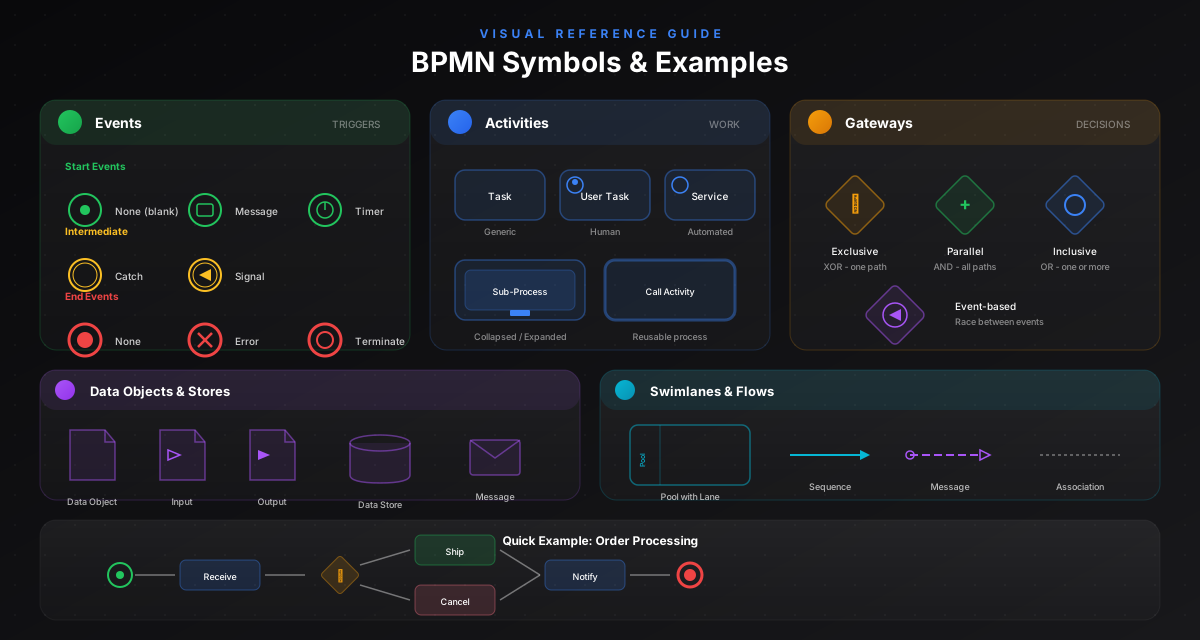
Events describe something that happens.
- Start event: how the process begins
- Intermediate event: something that happens during the process (message received, timeout, error)
- End event: how the process finishes
Practical tip: Use events sparingly. Your diagram should tell a story of work (activities), not a catalog of event types.
Activities (tasks and subprocesses)
Activities describe work that gets done.
- Task: a single unit of work (e.g., “Review request”)
- Subprocess: a group of tasks (use when the diagram gets too long)
Naming rule: Use verb-object naming:
- ✅ “Approve invoice”
- ✅ “Validate customer data”
- ❌ “Invoice approval”
Good naming is the fastest readability win.
The 12-step heuristic
If the happy path has more than ~12 activities, you are probably modeling at the wrong level of detail. Split into subprocesses.
Gateways (XOR, AND, OR) — the ones you actually need
Gateways describe branching logic.
- Exclusive (XOR): choose one path (most common)
- Parallel (AND): run paths in parallel
- Inclusive (OR): one or more paths may run
Best practice: Label outgoing flows with conditions:
- ✅ “Amount > 10,000”
- ✅ “Customer is enterprise”
- ❌ “High value”
- ❌ “Maybe”
If conditions are ambiguous, execution will be ambiguous.
Important
Unlabeled gateways are a common source of misalignment. If someone can interpret a branch differently, it will become an exception later.
Pools and lanes (ownership in the model)
Swimlanes show who does the work.
Use lanes to make responsibility explicit:
- “Sales”
- “Operations”
- “Finance”
- “IT”
This is where BPMN outperforms generic flowcharts: it makes handoffs and accountability visible.
Example: model an approval the right way
Approvals should be explicit activities.
A simple pattern:
- “Review request” (task)
- “Approve request” (task)
- XOR gateway:
- “Approved” → continue
- “Rejected” → notify requester and end
This pattern makes governance and audit trails straightforward.
Your first BPMN diagram: what to include (and what to skip)
Include:
- one start event
- activities that describe real work
- one or two gateways for real decisions
- explicit approvals
- lanes for roles
- one end event (or clear outcomes)
Skip:
- every possible exception
- obscure event types
- too much detail inside tasks
BPMN is a communication tool first. Execution comes later.
Common mistakes to avoid
Learn from others so you don't repeat the same pitfalls.
Using BPMN as a drawing
You lose ownership, conditions, and execution semantics.
Model roles (lanes), explicit decisions, and approvals.
Unlabeled gateway conditions
People interpret branches differently.
Label every branch with explicit conditions.
One giant diagram
Nobody reads it and it becomes unmaintainable.
Split into subprocesses and keep diagrams readable.
Take action
Your action checklist
Apply what you've learned with this practical checklist.
Use start and end events
Name tasks with verb-object
Add lanes for roles
Use XOR gateways for key decisions
Label every gateway branch
Model approvals explicitly
Split into subprocesses when needed