Automation
Browser agents + visual workflows—grounded in Operational Knowledge.
Create browser-based agents from screen recordings or voice. Run them with MCP compatibility and integrated prompt engineering—then wrap them into reliable, auditable flows.
Agent thinking (simulated)
“I will open the claims portal, locate case CLM‑1042, verify policy coverage, then update the payout status and attach proof of submission.”
“Update claim CLM‑1042 to paid and attach the confirmation screenshot.”
Open portal
Navigate to the right system and page.
Process automation
Learn, evaluate, and implement—without losing governance
Use our 2026 guides to understand process automation (and agentic automation), then move from knowledge to governed execution with approvals, exceptions, and evidence artifacts—guided by HEIDI.
Governed execution primitives
Approval gates, exception paths, evidence artifacts, version logs.
Agentic automation, safely
Narrow guardrails + mission oversight (Command Center).
Less blue, more readability
Neutral surfaces with on-brand accents for comfortable reading.
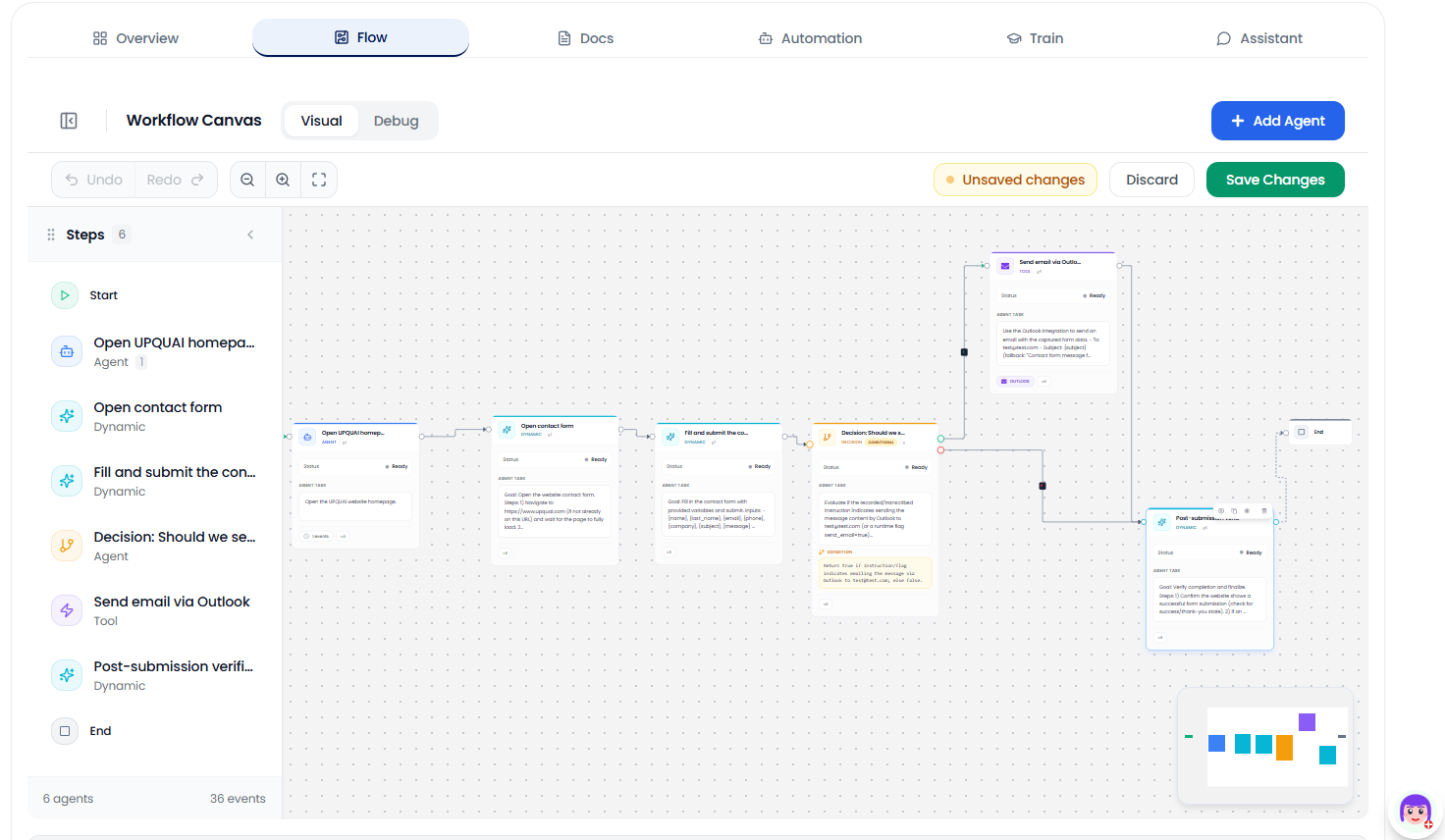
Visual flow builder
Transparent steps. Clear approvals. No black boxes.
Control the complexity
Business-friendly by default. Technical when needed.
Start simple with clear steps and approvals. Dial up control with MCP tools, agent policies, and reusable blocks—without turning work into a black box.
Simple mode
- Clear steps & ownership
- Approvals & exceptions
- Human-in-the-loop controls
Technical mode
- MCP tool access
- Agent policies & guardrails
- Reusable blocks & versioning
Build workflows visually
Create automations with a clear, visual builder. Make steps explicit so business and IT can agree on what happens next—before anything runs.
Standardize execution across teams
Reduce rework and manual follow‑ups
Make handoffs visible and reliable
Scale best practices, not tribal knowledge
Built on Operational Knowledge
Automations are grounded in your Operational Knowledge so they reflect how your business actually works—and so agents can execute with context instead of guessing.
Document → validate → automate → improve. One loop across teams.
MCP-compatible agents
Use MCP compatibility to connect tools and actions to your agents—so they can operate in the browser and across systems while staying controllable.
Tool access with clear contracts
Audit-friendly execution trail
Reusable tool sets across agents
Fits into workflows and approvals
tool: "browser.navigate"
input: { url: "https://portal.company/" }

tool: "browser.type"
input: { selector: "#caseId", text: "CLM-1042" }
Prompt engineering—built in
Turn a goal into reliable execution. Prompts, tool instructions, and guardrails are generated and refined so your teams don’t have to become prompt specialists.
Goal
Update claim CLM‑1042 to paid
Context
Operational Knowledge SOP + policy rules
Tools
Browser actions via MCP
Guardrails
Approvals, logging, and safe defaults
Use cases
Automations that business and IT both trust
Start with Operational Knowledge. Add browser agents for execution. Wrap everything in clear workflows and approvals.
Claims processing
Faster cycle times with fewer mistakes
- Agent updates portals
- Approvals for exceptions
- Evidence captured automatically
Customer onboarding
Consistent steps across teams and regions
- Checklists from SOPs
- Browser data entry
- Audit trail for compliance
Procurement & approvals
Fewer follow-ups and clearer ownership
- Route approvals
- Validate documents
- Write back to systems
Support operations
Less copy/paste, faster resolution
- Retrieve knowledge
- Draft responses
- Update tickets in the browser
Compliance checks
Repeatable controls you can prove
- Run checks consistently
- Log decisions
- Escalate when needed
Back-office reporting
Reliable data gathering without manual work
- Collect from web apps
- Normalize fields
- Hand off for review
Frequently asked questions
Learn more about how Process Designer works and how it can help your organization.
How is this different from RPA?+
RPA (Robotic Process Automation) is brittle; if a button moves, the bot breaks. Our browser agents use AI vision and DOM understanding to adapt to UI changes. Plus, our automation is grounded in Operational Knowledge, so it understands the process, not just the clicks.
What makes it 'auditable'?+
Every step, decision, and tool execution is logged. You can see exactly why an agent took an action, which policy it followed, and who approved it. No black boxes.
Do I need to know how to code?+
No. You build workflows visually. For agentic steps, you describe the goal in plain English (or voice), and HEIDI handles the prompt engineering and tool selection.
Can it integrate with my internal APIs?+
Yes. Process Designer is MCP-compatible (Model Context Protocol). You can securely connect your internal APIs and databases as tools that agents can use under strict access controls.
How do you handle human approvals?+
Approvals are first-class citizens. You can drag-and-drop an Approval step into any workflow. The automation pauses, notifies the right person, and only proceeds when they sign off.