Definition
Agent orchestration coordinates multiple specialized agents to complete a workflow safely: deterministic execution for known steps, dynamic agents for recovery, tool agents for connectors, and shared context for handoffs. Long-term memory keeps behavior consistent across runs, while trace logs and telemetry make outcomes auditable and improvable.
- A2A orchestration is how you scale beyond “one agent that tries”.
- Shared execution context enables reliable handoffs between specialist agents.
- Long-term memory should be structured, retained intentionally, and governed.
- Trace logs and telemetry are the foundation for audits, debugging, and improvement.
- Reliability primitives (selector repairs, context compaction, safe fallback) make agents operable.
Why orchestration matters (and why single-agent automation plateaus)
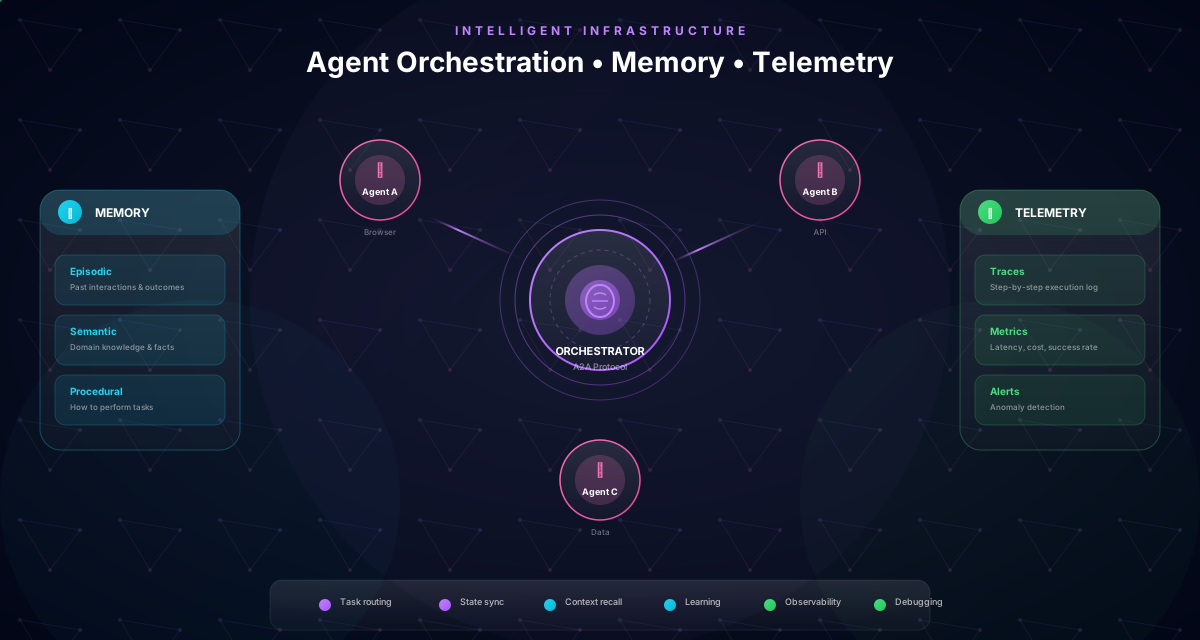
A single agent can complete a demo. Production workflows need specialization.
In internal environments, the workflow usually mixes:
- deterministic steps (repeatable UI actions)
- dynamic recovery (UI drift, state differences)
- connector actions (email, files, calendar, chat, meeting artifacts)
- governance steps (approvals, evidence capture, audit trail)
Orchestration is the layer that coordinates these capabilities so the workflow stays readable and operable. Instead of one agent doing everything, you run a set of roles with explicit handoffs and shared context.
Reference architecture: orchestrator + specialists + memory + telemetry
Orchestration is what turns “agents” into an automation system you can run in production.
The reference architecture (simple view)
Trigger → Orchestrator → (tool actions + browser actions) → Outcome
           ↘ shared execution context (variables + evidence) ↙
           ↘ long-term memory (retained knowledge) ↙
           ↘ trace logs + telemetry (audits + debugging) ↙
What each layer is responsible for
- Orchestrator: sequences steps, coordinates A2A handoffs, enforces guardrails (timeouts, allowed actions, approvals).
- Specialist agents: do focused work (deterministic execution, dynamic recovery, connector/tool actions).
- Shared execution context: carries inputs and intermediate results so handoffs are explicit instead of “implicit in chat”.
- Long-term memory: persists durable rules, definitions, recurring repairs, and operational context across runs.
- Trace logs + telemetry: record what happened (and why), so you can debug, audit, and improve.
Why this matters for internal automation
Internal workflows change: UIs drift, permissions differ, approvals are required, and exceptions happen. A reference architecture makes that change manageable:
- deterministic where possible
- adaptive where necessary
- governed always
The result is not “AI doing things”. It’s an operating model for automation that teams can scale.
Orchestration is the product
Agents are a capability. Orchestration, memory, and traceability are what make that capability operable in real internal environments.
Agent roles: deterministic execution, dynamic recovery, and tool-enabled steps
Enterprise automation benefits from specialists.
The three roles you’ll use most
-
Deterministic executor
- runs known steps (often derived from recordings)
- best for repeatability, speed, and low-risk UI actions
-
Dynamic browser agent (recovery)
- used when a deterministic step fails (selector drift, state differences)
- should be scoped: recover the step, then return control
-
Tool/connector agent
- reads or writes via connectors (email, files, calendar, chat, meeting artifacts)
- best for high-volume data access and stable system-of-record operations
A practical operating rule
- run deterministically by default
- fall back dynamically only for the smallest possible scope
- use connectors for data movement, browser agents for UI-only gaps
A quick comparison
| Role | Strength | When to use |
|---|---|---|
| Deterministic executor | predictable + fast | stable UI steps, repeatable flows |
| Dynamic recovery agent | resilient to drift | broken selector, unexpected UI state |
| Tool/connector agent | scalable data access | system-of-record reads/writes |
When roles are explicit, A2A handoffs become safe: each agent receives the context it needs, produces an output you can log, and hands back control to the workflow.
Make fallback small and rare
Treat dynamic recovery as a controlled exception path. If fallback happens often, invest in stable attributes, better validation, or a connector for the step.
A2A handoffs: how specialist agents share context safely
In practice, A2A is less about “agents chatting” and more about controlled handoffs.
A reliable handoff includes:
- what step just completed
- the structured result of the step
- what variables should be updated
- what evidence should be captured
- what the next agent is allowed to do
This is why progressive context management matters: each agent receives enough context to act, without inheriting a runaway history that causes timeouts or confusion.
A well-orchestrated workflow is a system: deterministic where possible, adaptive where necessary, and governed always.
Context management at scale: progressive context, compaction, checkpoints
Browser automation can generate a lot of context: screenshots, DOM state, action history, and intermediate outputs. If you pass all of it into every model call, reliability drops: timeouts increase and costs spike.
Progressive context (the default for long workflows)
Progressive context means the agent sees:
- a minimal initial context (objective + constraints)
- a step context that includes only the current step plus the most relevant recent actions
- a reference steps list (condensed, not a full transcript)
Compaction (summarize the past, keep the present)
Instead of growing history unbounded, compaction keeps a sliding window:
- keep the last (N) messages verbatim
- summarize older messages into a durable “what happened so far”
- record how many messages were compacted and how much context was reduced
Checkpoints (resume without re-running everything)
Checkpoints save state at milestones. They enable:
- resumable runs after incidents
- safe handoffs between roles (for example, after an approval)
- faster recovery when a step fails late in the workflow
What to monitor
If your telemetry shows context reduction is low and timeouts are high, tighten budgets and improve compaction. Context management is not a tuning detail — it is a reliability primitive.
Make context stats a KPI
Track how much context is reduced and how often compaction triggers. It’s the easiest early warning signal for “this workflow will time out at scale”.
Failure taxonomy: classify failures so reliability becomes a roadmap
To scale automation, you need a shared language for failures. Without classification, every incident feels unique — and you never improve systematically.
The most common failure categories
- Selector drift: the UI changed, locators no longer match.
- Auth/session drift: SSO session expired, MFA prompt appears, login screen interrupts.
- Data quality: missing fields, invalid formats, mismatched vendor/user names.
- Permissions: the account cannot access a page or action.
- State divergence: the entity already exists, is already approved, or is in an unexpected state.
- Integration outages: connector calls fail, rate limits trigger, network is flaky.
How classification maps to fixes
| Failure type | Fix strategy | Preventive control |
|---|---|---|
| Selector drift | stable attributes + selector repairs | UI automation-ready checklist |
| Auth drift | detect login + human checkpoint | least-privilege accounts + explicit controls |
| Data quality | pre-flight validation + normalization | input schema + required fields |
| Permissions | role checks + escalation | RBAC mapping + ownership |
| State divergence | idempotency checks + branching | “already exists” checks |
| Outages | retries/backoff + queues | timeouts + repair loops |
The goal is simple: turn trace evidence into a prioritized reliability backlog. Fix the highest-frequency categories first — success rate will move fast.
Don’t chase one-off failures
A single weird run is rarely worth fixing. Use telemetry distributions (failure breakdown + step index) to pick the changes that measurably improve success rate.
Memory types: context vs episodic vs long-term
Not all memory should live forever.
A practical schema is:
- context memory: short-lived details for the current run (inputs, intermediate values)
- episodic memory: what happened in a specific run (exceptions, outcomes, repairs)
- long-term memory: durable rules and definitions (terminology, completion criteria, recurring repairs)
Long-term memory is most valuable when it is structured and reviewed. If you let everything become memory, you build noise. If you only keep nothing, you build inconsistency.
A retention policy and ownership is how memory becomes an enterprise asset instead of a liability.
Pro Tip
Treat long-term memory like documentation: version it, assign an owner, and review it on a cadence—especially for approvals and controls.
Memory engineering: what to store, what to forget, and how to keep it safe
Long-term memory is not “keep everything forever”. It’s curated knowledge that makes agents consistent without making them risky.
What to store (high-signal, reusable)
- Definitions and glossary: how your org names systems, teams, roles, and artifacts.
- Field mappings: where critical data lives and how it’s formatted.
- Approval rules: thresholds, owners, escalation logic (documented and reviewed).
- Recurring exceptions: the top failure patterns and the correct repair steps.
- Validated templates: intake forms, checklists, and “definition of done” criteria.
What not to store
- credentials, tokens, secrets
- raw screenshots/DOM dumps
- personal data that isn’t required to operate the workflow
How to keep memory trustworthy
- Structure it: context vs episodic vs long-term, with clear intent.
- Scope it: session-only vs workflow-wide vs shared across a workspace/team.
- Retain intentionally: use TTL/retention rules and refresh on a cadence.
- Assign ownership: memory that influences controls must have an owner.
A quality bar for memory updates
Before promoting something to long-term memory, ask:
- Is it stable for at least a quarter?
- Is it specific and testable?
- Would storing it create security or privacy risk?
Memory is what turns automation from “works once” into “improves over time” — but only if it’s governed like any other operational asset.
Never treat memory as a secret store
Keep credentials out of memory. Store durable rules and definitions, not sensitive authentication material.
Trace logs: what to record so you can audit and improve
Trace logs are the source of truth for what the automation did.
A useful trace includes:
- run id and session id
- workflow name and agent names
- ordered events with timestamps and durations
- action attempts and outcomes
- failure classification and recovery actions
- selector repairs (original and repaired locator)
- context reduction stats (how much was summarized)
With this, you can answer enterprise questions:
- Did the workflow follow policy?
- Which step failed and why?
- How often does a specific exception happen?
- Which selector breaks after releases?
- Where do we need better governance or better inputs?
If you build trace logs early, every improvement becomes cheaper.
Self-healing selectors: make UI drift a manageable maintenance task
UI automation fails most often on one thing: selectors that no longer match after a release.
A production approach is not “rewrite the workflow every time”. It’s a reliability loop:
- prefer stable attributes in the UI (like
data-testidandaria-label) - derive stable locators when a brittle selector breaks
- persist repairs so future runs get more reliable
- review repairs after releases as part of operations
What “self-healing” means in practice
Self-healing does not mean guessing wildly. It means using stronger signals:
- stable attributes owned by your internal teams
- role/name pairs and consistent labels
- predictable DOM patterns for form fields and confirmation states
A recommended standard for internal apps
- add
data-testidto primary actions and confirmations - keep
aria-labelstable for icon-only buttons - avoid depending on layout-driven locators like
nth-of-type - include a “write confirmation” element after critical updates
Make repairs operational, not heroic
Treat selector repairs like incidents:
- capture evidence in trace logs
- record the repair (original vs repaired locator)
- measure repair frequency and success rate
- turn repeated repairs into UI improvements
When self-healing is part of the system, UI drift becomes a maintenance task — not an outage.
Stable attributes are the cheapest fix
A single sprint of `data-testid` coverage can eliminate most selector incidents — and improves QA and accessibility at the same time.
Trace review walkthrough: how teams debug and improve in minutes
The difference between “agents are flaky” and “agents are reliable” is usually operational discipline.
A 10-minute trace review loop
-
Start with the summary
- success vs failure count
- failure breakdown by type
- total duration and p95 duration
-
Jump to the failing step
- which step index failed?
- what action type?
- what changed in the page URL or state?
-
Classify the fix
- selector drift → stable attributes + selector repair
- auth drift → checkpoint or approved auth flow
- data quality → validation + normalization
- state divergence → idempotency check + branch
-
Apply the smallest change that makes the workflow safe
- prefer diffs and targeted edits over rewrites
-
Run again and watch the metric move
- success rate and recovery rate should improve
What a useful trace event captures
- step index, action type, ok/fail
- duration and failure type
- evidence (page URL, locator used, what was repaired)
Once you treat trace review as a cadence, reliability becomes measurable and repeatable.
Fix frequency before fixing severity
A rare catastrophic edge case can wait. Fix the top 2–3 recurring failures first and your success rate will jump quickly.
Telemetry that matters: the metrics that make agents operable
Telemetry is only useful if it drives action.
For internal automation, the highest-signal metrics are:
- success rate over time (per workflow and per agent role)
- failure breakdown (by failure type and step)
- p95 duration (where time is spent)
- recovery rate (how often fallback is needed and whether it succeeds)
- selector repair activity (what changes in the UI after releases)
- exception queue volume (where humans are still required)
- context reduction stats (whether context compaction prevents timeouts)
How teams use these metrics
- identify the 2–3 steps that cause most failures
- standardize repairs (stable attributes, validation, retries)
- decide when to upgrade a UI step into a connector integration
- measure cost and throughput before scaling
When you can see reliability as data, automation becomes an engineering discipline instead of a guessing game.
Track failures by category, not by story
Operators tell anecdotes. Telemetry tells the distribution. Use failure categories to pick improvements that move the success rate measurably.
Change management: improve agents with traceable diffs and asset-driven context
Orchestration and observability are only half the story. The other half is safe change.
A practical change workflow:
- propose a change based on trace evidence (what failed, where)
- attach asset context (SOPs, recordings, documents) so the change is grounded
- generate a diff for the workflow rather than rewriting it blindly
- review and apply (especially for approval steps and controls)
- monitor post-change telemetry to confirm the fix
This is how you avoid “we fixed it and broke three other things”. Agents become a governed asset: updated intentionally, traced end-to-end, and validated by metrics.
A2A patterns library: reusable collaboration structures for agents
A2A orchestration becomes scalable when you reuse patterns instead of inventing new structures for every workflow.
Pattern 1: Baton pass (sequential handoff)
When to use: a workflow crosses domains (connectors → browser UI → notifications).
Structure:
- tool agent gathers data and evidence
- deterministic executor performs known UI steps
- dynamic recovery agent handles drift (only if needed)
- tool agent writes results back (email, tracker, ticket)
What to log: inputs, approvals, confirmation ids, and trace links.
Pattern 2: Supervisor + specialists
When to use: the workflow mixes decision-making and execution.
Structure:
- supervisor/orchestrator assigns micro-tasks to specialists
- specialists return structured outputs
- supervisor decides next step and updates shared context
What to log: each specialist output + the decision that followed.
Pattern 3: Reviewer/approver loop (human-in-the-loop)
When to use: access changes, financial actions, compliance evidence.
Structure:
- agent proposes the action (with evidence)
- human approves/rejects
- agent executes with trace logging
What to log: approval identity, timestamps, and evidence captured.
Pattern 4: Exception triage agent
When to use: failures need fast classification and consistent repair.
Structure:
- on failure, route to triage role
- classify failure type (selector/auth/data/state)
- propose smallest safe fix (diff-first)
- route to human queue if risk is high
What to log: failure category, proposed fix, and post-fix success rate.
Pattern 5: Parallel specialists (AND join)
When to use: independent evidence collection or approvals must happen in parallel.
Structure:
- run two specialists in parallel (for example legal + finance)
- join only when both complete
What to log: each branch result + join decision.
The key principle: patterns create operational leverage
If every workflow has its own structure, reviews and audits become slow. If you standardize patterns, orchestration becomes predictable — and reliability improves faster.
Name your patterns, document them, and reuse them across workflows.
Standardize patterns like an engineering team
Pick 5–7 patterns and make them the default building blocks. You’ll reduce variance, speed up reviews, and increase reliability across every new workflow.
Security and governance: make orchestration safe by design
Orchestrated agents touch internal systems. Safety is not a feature you add later — it’s a design requirement.
Practical guardrails that work
- Least privilege: run with roles that match the process, not shared admin accounts.
- Explicit approvals: keep humans accountable for high-risk decisions.
- Allowlists/denylists: restrict side-effectful actions by default.
- Fail closed: when auth, permissions, or evidence is missing, stop safely.
Protect traces and memory
- store trace logs to enable audits and debugging
- sanitize heavy payloads (avoid storing large binary/image blobs)
- keep secrets out of memory and out of prompts
- enforce retention policies (TTL) and review cadence
Separation of duties (enterprise reality)
- builders define workflows and controls
- operators monitor runs and handle exceptions
- reviewers approve changes that affect controls
Governance is what prevents “shadow automation”. With the right guardrails, A2A orchestration becomes a controlled system of work — not an uncontrolled bot surface.
Don’t bypass controls
If a workflow changes access or money, approvals and evidence capture are non-negotiable. Automate execution, not accountability.
Operations runbook: monitor, triage, repair, and resume
Orchestrated automation needs an operating rhythm. A runbook is how you keep reliability high without heroics.
Daily/weekly monitoring (what to watch)
- success rate and recovery rate
- failure breakdown (by type and step index)
- exception queue volume and age
- p95 duration (where time is spent)
- selector repair activity after UI releases
Triage workflow (what to do when a run fails)
- open the session summary
- jump to the failing step and inspect the action + evidence
- classify the failure category
- decide: fix selector vs fix data vs add guardrail vs add approval
- apply the smallest safe change (diff-first)
- rerun and confirm the metric moves
Repair patterns that work in practice
- add pre-flight validation for missing data
- add idempotency checks for “already exists” states
- add a checkpoint before risky steps (especially approvals)
- persist selector repairs and add stable UI attributes
- route unresolved cases to a human repair loop and resume
Release-day checklist for internal apps
- run a canary workflow on the new UI
- review selector repair events
- confirm critical confirmations still exist
- update runbooks and owners if paths changed
Runbooks make agent automation predictable — and predictable systems scale.
Operate workflows, not bots
When agents fail, the right response is not “try again”. It’s triage + classification + a targeted fix that improves the next 100 runs.
90-day roadmap: from first orchestrated workflow to an automation portfolio
A2A orchestration becomes powerful when you can repeat it. Use this roadmap to scale deliberately.
Days 0–30: ship one reliable workflow
- pick one high-ROI workflow with a clear owner
- record or specify the deterministic happy path
- define approvals and evidence capture
- enable trace logs + failure taxonomy
- add basic long-term memory (definitions + recurring exceptions)
- create a simple operations runbook
Days 31–60: standardize and harden
- standardize 5–7 patterns (approvals, escalations, exception queues)
- expand connectors for data-heavy steps
- add self-healing selector repairs and UI attribute coverage
- tighten context budgets and monitor compaction stats
- build a reliability backlog from telemetry distributions
Days 61–90: scale the portfolio
- onboard 3–5 additional workflows with the same playbook
- define SLOs (success rate, time-to-repair)
- formalize change management (diff-first, review, rollout)
- schedule monthly trace reviews and quarterly memory reviews
The goal is repeatability: a workflow factory that produces reliable automations across teams and internal systems.
Standardize before you scale
If every workflow has its own patterns, you’ll never get operational leverage. Standard patterns make reviews, audits, and reliability improvements dramatically faster.
Operating model: design → run → review → improve
Agentic automation is not “set and forget”. It is a lifecycle.
A lightweight operating model:
- design: record or specify the workflow, define approvals and evidence
- run: execute deterministically, recover safely, route exceptions
- review: inspect trace logs, classify failures, review memory updates
- improve: apply changes with traceable diffs, update SOPs, retrain operators
This is how you scale agent automation across a portfolio of internal workflows without turning it into chaos.
Why internal apps make observability non-negotiable
Internal apps are audit-heavy and change-heavy.
When an internal portal changes, you need:
- clear failure visibility
- fast repair loops
- evidence that approvals were respected
- confidence that the automation did not leak data
This is why Process Designer emphasizes telemetry, selector repairs, and context control as product capabilities. In internal automation, reliability is a feature—not an afterthought.
Common mistakes to avoid
Learn from others so you don't repeat the same pitfalls.
Treating orchestration as an implementation detail
You end up with one opaque agent and unpredictable behavior.
Make roles explicit and define safe handoffs through shared context.
Logging too little
Audits and debugging become guesswork.
Define a trace schema early and store run-level telemetry by default.
Making memory unlimited
Noise grows and behavior becomes inconsistent.
Structure memory types, set retention, and review durable memory like documentation.
Take action
Your action checklist
Apply what you've learned with this practical checklist.
Define agent roles and allowed actions per role
Implement shared execution context and safe handoff rules
Persist long-term memory with retention and ownership
Store trace logs and telemetry for every run
Review failures monthly and standardize repairs