Definition
Workflow design patterns are reusable structures for common workflow problems: approvals, parallel work, timeouts, escalations, and exception handling. Patterns make workflows easier to design, review, and govern—so automation stays reliable as teams and systems evolve.
- Patterns make workflows faster to build and safer to change.
- Approvals and escalations are core reliability patterns.
- Parallel review reduces cycle time without losing governance.
- Timers and retries keep workflows resilient to delays and outages.
- Exception queues prevent side-channel chaos.
Pattern: Request → approve → execute
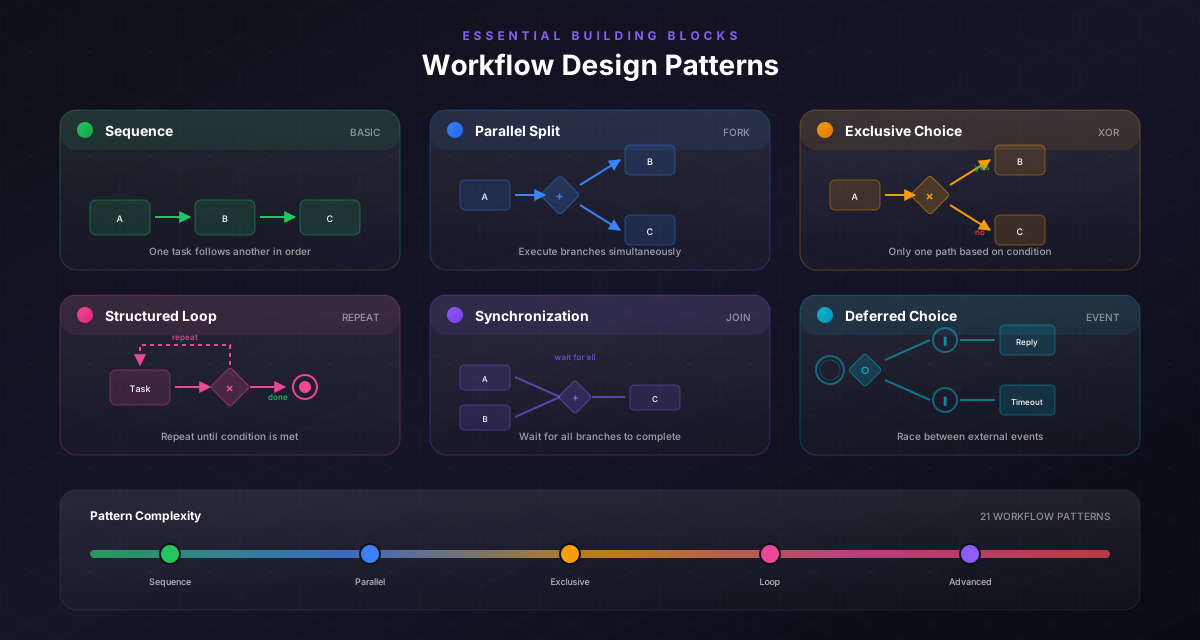
A classic pattern for governance-heavy work.
Structure:
- capture request data
- validate required fields
- approval step (role-based)
- branch: approved/rejected
- execute stable steps
Use it for purchases, access changes, policy exceptions, and discounts.
Pattern: Parallel review (AND join)
When two teams must review independently.
Structure:
- split into two parallel lanes (legal + finance)
- each lane approves/rejects
- join only when both are complete
This pattern reduces cycle time without removing controls.
Pattern: SLA timer + escalation
Work gets stuck when nobody responds.
Structure:
- start a timer after assignment
- send reminder after X hours
- escalate after Y hours
- reassign or notify manager
This pattern turns “waiting” into a managed state.
Important
Escalations only work if ownership is clear. Define who is responsible for unblocking the workflow.
Pattern: Retries + idempotency for integrations
Integrations fail. The workflow must survive.
Structure:
- retry with backoff
- use timeouts
- log failures
- ensure steps are idempotent (running twice doesn’t break things)
This is the difference between a demo and production.
Pattern: Exception queue (human repair loop)
When automation can’t proceed, don’t fail silently.
Structure:
- route exceptions to a queue
- assign an owner
- capture context (what failed, data, logs)
- allow manual resolution and resume
This pattern prevents exceptions from leaking into email threads.
Exceptions are data
Track exception categories. If one exception happens often, it’s a design signal to improve the workflow or upstream process.
Common mistakes to avoid
Learn from others so you don't repeat the same pitfalls.
Inventing patterns per workflow
Teams re-learn the same lessons and create inconsistent flows.
Standardize 5–7 patterns and reuse them across workflows.
No escalation rules
Work gets stuck in “waiting” forever.
Add timers, reminders, and escalation ownership.
No exception repair loop
Exceptions leak into side channels.
Route exceptions to a queue with context and resume capability.
Take action
Your action checklist
Apply what you've learned with this practical checklist.
Standardize request-approve and escalation patterns
Add a repair loop (exception queue)
Use parallel review when multiple teams approve
Add timers for SLA-sensitive workflows
Add retries/timeouts for integrations
Review patterns quarterly