90-second setup
Set up HEIDI Workspace in about 90 seconds
HEIDI reads your recent mail, surfaces real patterns from your inbox, and proposes sorting and next steps. You stay in control — nothing runs until you approve.
Step 01
Meet HEIDI
A short guided intro explains what HEIDI will do: read recent messages, find patterns that actually appear in your mailbox, and show how sorting would work — without changing anything yet.

Step 02
Connect and read your mailbox
HEIDI connects to your mailbox and reads recent messages. Bodies are checked only where needed. You can talk to HEIDI while the reading continues in the background.

Step 03
Discover real patterns
Instead of generic rules, HEIDI shows patterns that appeared in your recent mail — meeting updates, follow-ups, marketing, and more — with counts from what was actually read.

Step 04
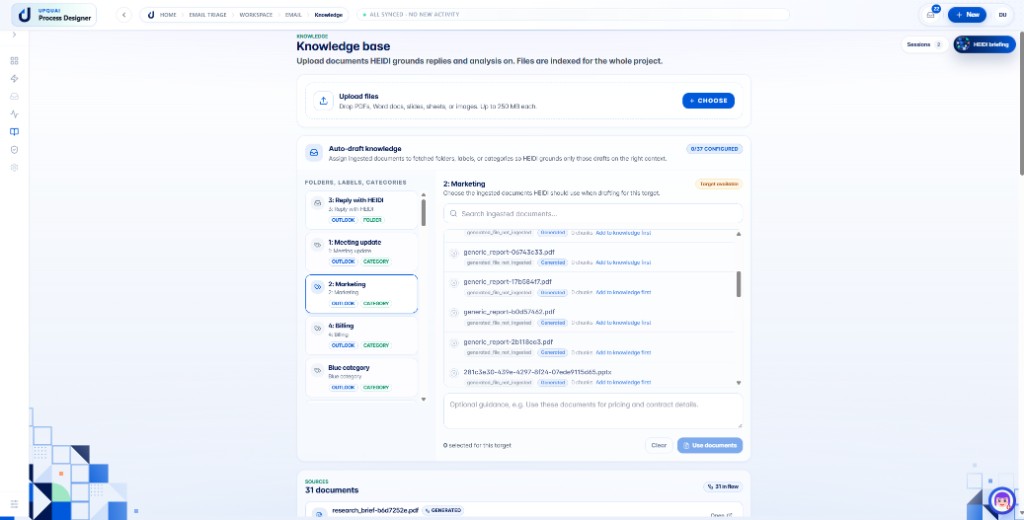
Ground replies in your knowledge
Upload manuals, policies, and contracts, then map them to triage targets so auto-drafts pull from approved documents — not guesses.
Step 05
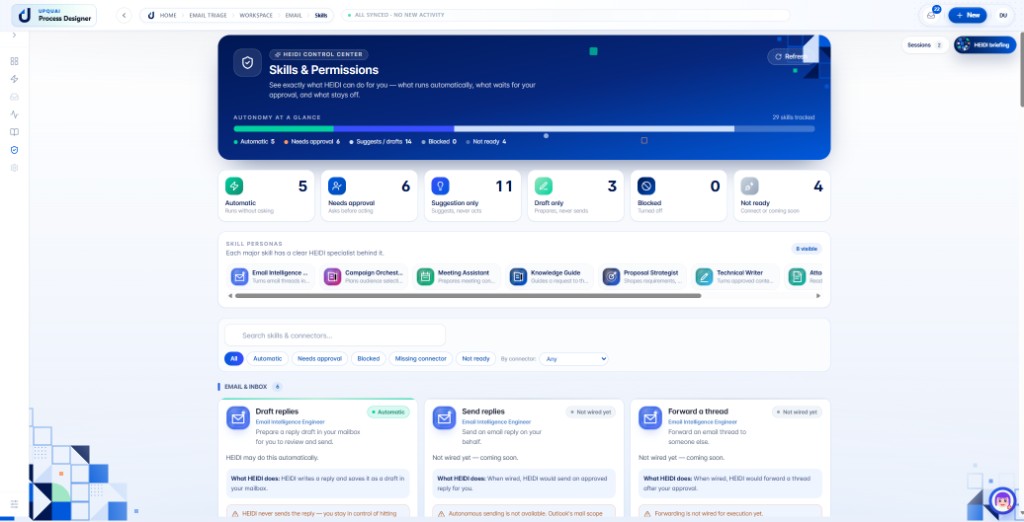
Set skills and permissions
Review what runs automatically, what needs your approval, and what stays draft-only. Each skill has a clear autonomy level before HEIDI acts on your behalf.
90-second setup FAQ
Common questions about data scope, control, and moving from quick setup to full automation.